Savant Power & Light App - Adding Power Sources
| Document Date: | August 2026 |
| Document Supports: | Savant OS 11.1 and higher SP&L Version 3.3 and higher |
Overview
This guide is one of several that describe the functions within the SP&L app. For links to all available articles, refer to the Savant Power & Light App – Initial Smart Panel Configuration.
Wiring Setup
Savant Power Storage 20/50
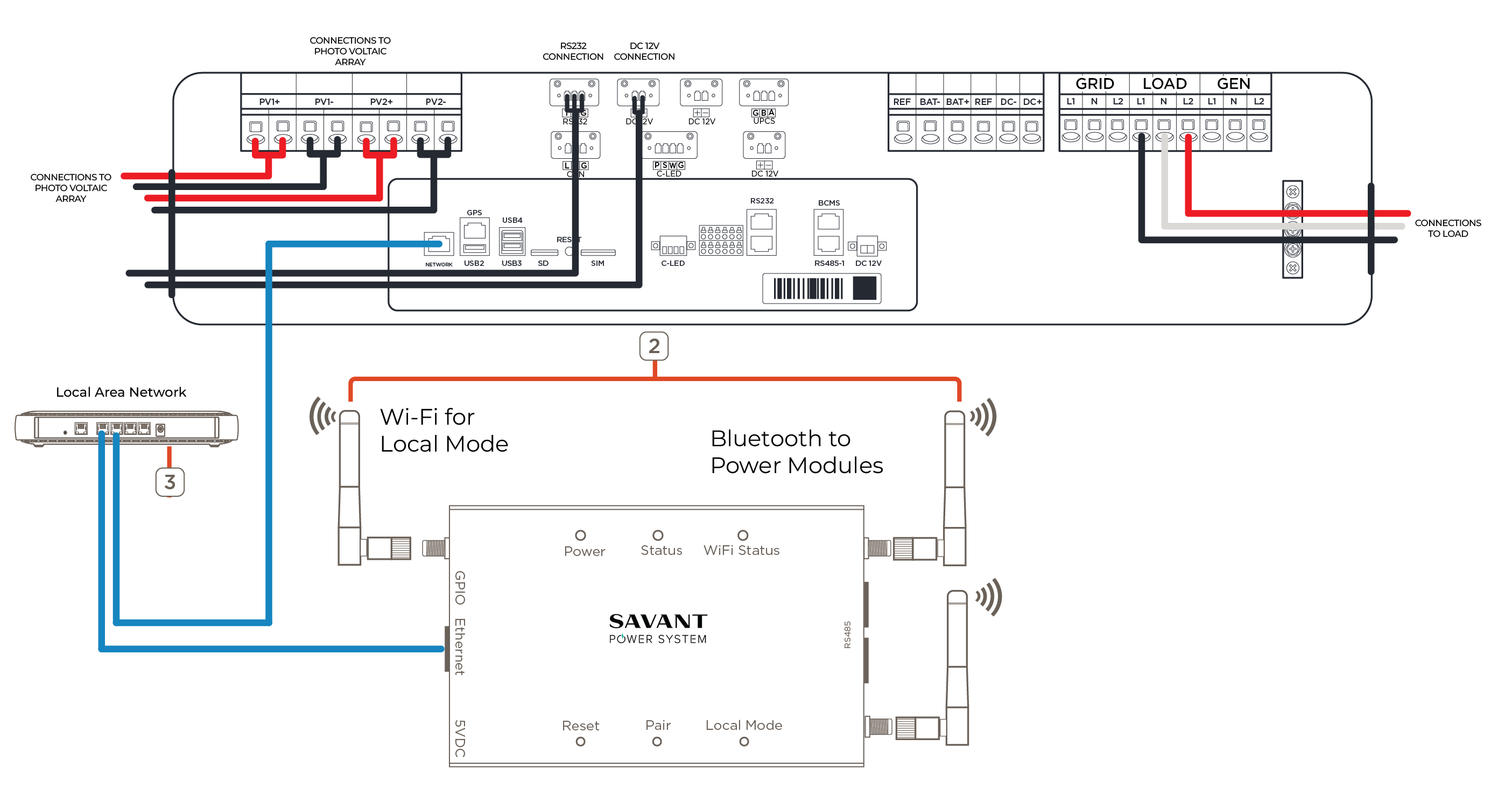
For more information on wiring a Savant Power Storage System, see the Savant Power Storage 20 Installation Guide or Savant Power Storage 50 Installation Guide.
Tesla & Enphase
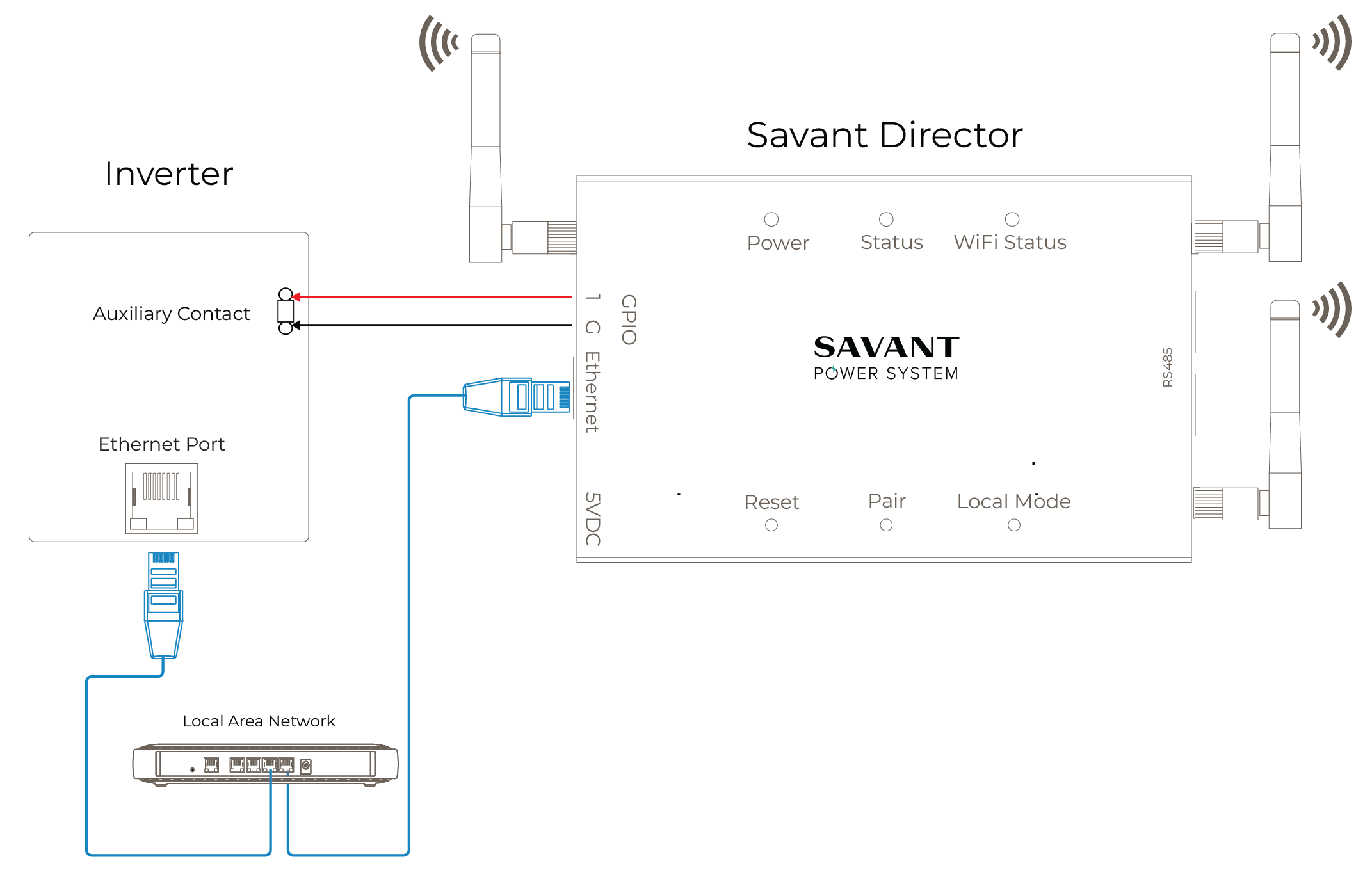
Follow the diagram and instructions below to establish communication between the Director and a Tesla or Enphase inverter. For more information on Tesla integration see the Savant Load Management with Tesla Powerwall - Supplemental Integration Guide. For more information on Enphase integration see the Savant Load Management with Enphase - Supplemental Integration Guide.
IMPORTANT NOTES:
- Ethernet and auxiliary contact location will vary between inverter types.
- The inverter and the Director must be connected to the same home network (wired or Wi-Fi).
- A microgrid power source and Savant Director must be on the same subnet to be able to communicate.
- Enphase inverters require a GPIO connection between the inverter and Director. Savant recommends, but does not require, a GPIO connection between a Tesla inverter and Director; however, if the GPIO is being used to detect the grid, the GPIO on the Director must be connected to Aux 3/4 on the Tesla Gateway. Follow the steps below:
Configuring Tesla for Grid Detection
- Connect the GPIO on the Director to Aux 3/4 on the Tesla inverter.
- From the Tesla Pros app, navigate to Settings > Advanced Settings > Low Voltage Relay Control and set Configuration Type to Off-grid Load Shedding, then DONE.
SolarEdge
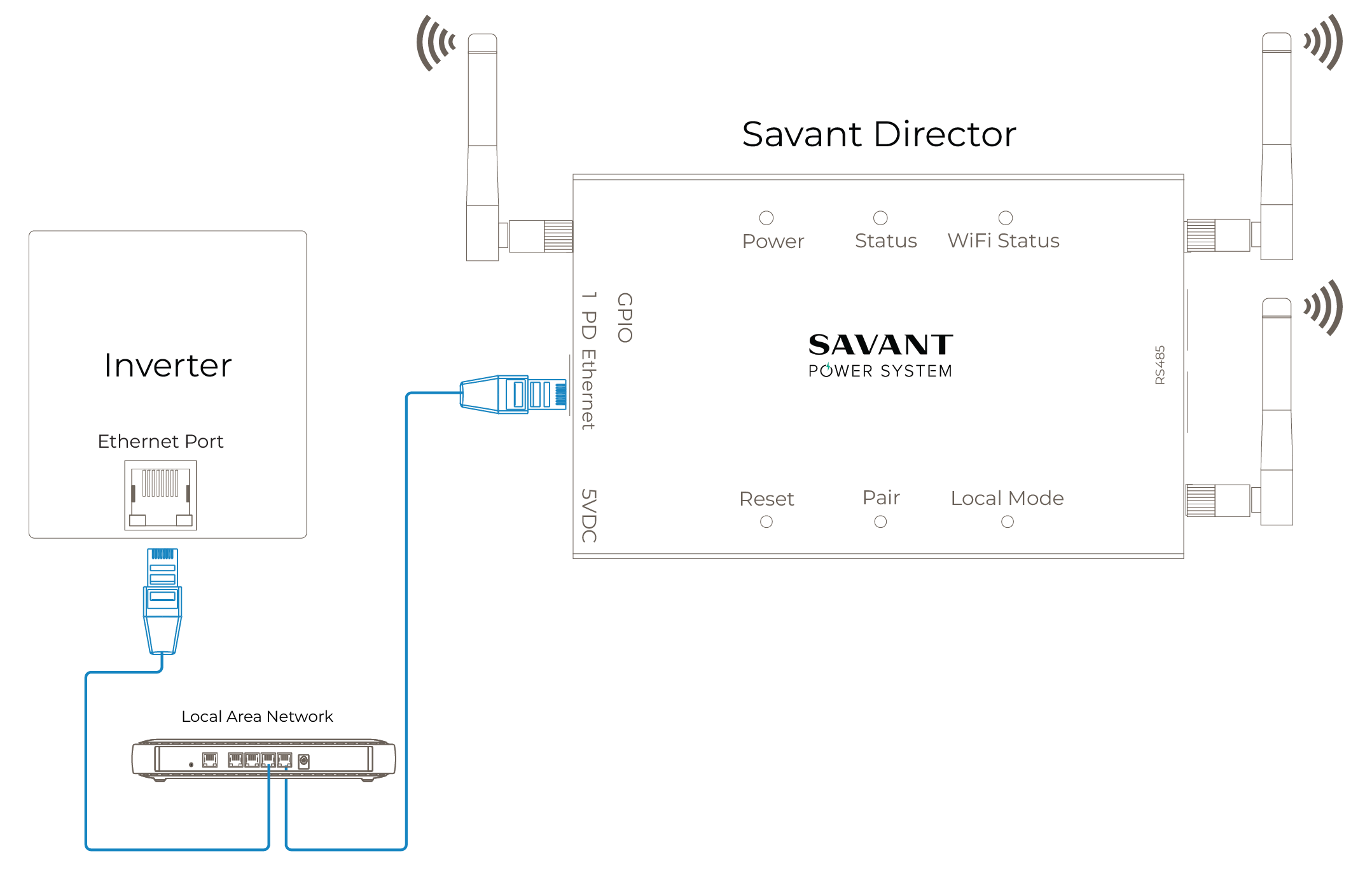
Follow the diagram below to establish communication between the Director and a SolarEdge inverter.
IMPORTANT NOTES:
- Ethernet port location will vary between inverter types.
- The inverter and the Director must be connected to the same home network (wired or Wi-Fi).
- A microgrid power source and Savant Director must be on the same subnet to be able to communicate.
- SolarEdge support must be contacted to unlock the inverter so a Director is able to communicate to it.
FranklinWH
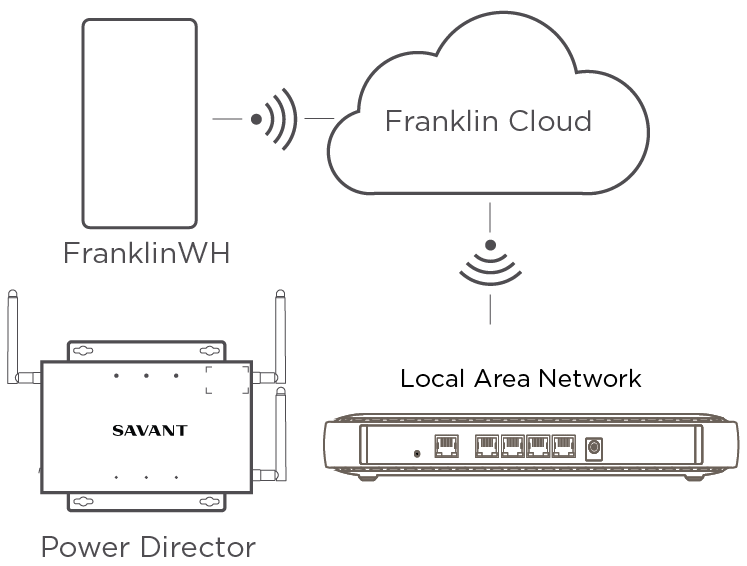
The diagram below is an example of the communication between a Savant Director and a FranklinWH inverter. There is no physical connection to the Director, however the FranklinWH must be connected to the Franklin Cloud for successful communication with Savant.
NOTE: The Franklin cloud API only updates every 5-15 minutes, so energy data shown in the Savant App may be delayed.
Power Source Settings
This section covers all inverter settings and their definitions. All settings listed within this section must conform to the parameter settings according to site design listed in the inverter specific Savant Power System Deployment Guide.
IMPORTANT NOTE: To connect an Inverter’s IP address to the Home, select the menu icon at top right, and choose Devices on Network.
Savant Power Storage 20/50
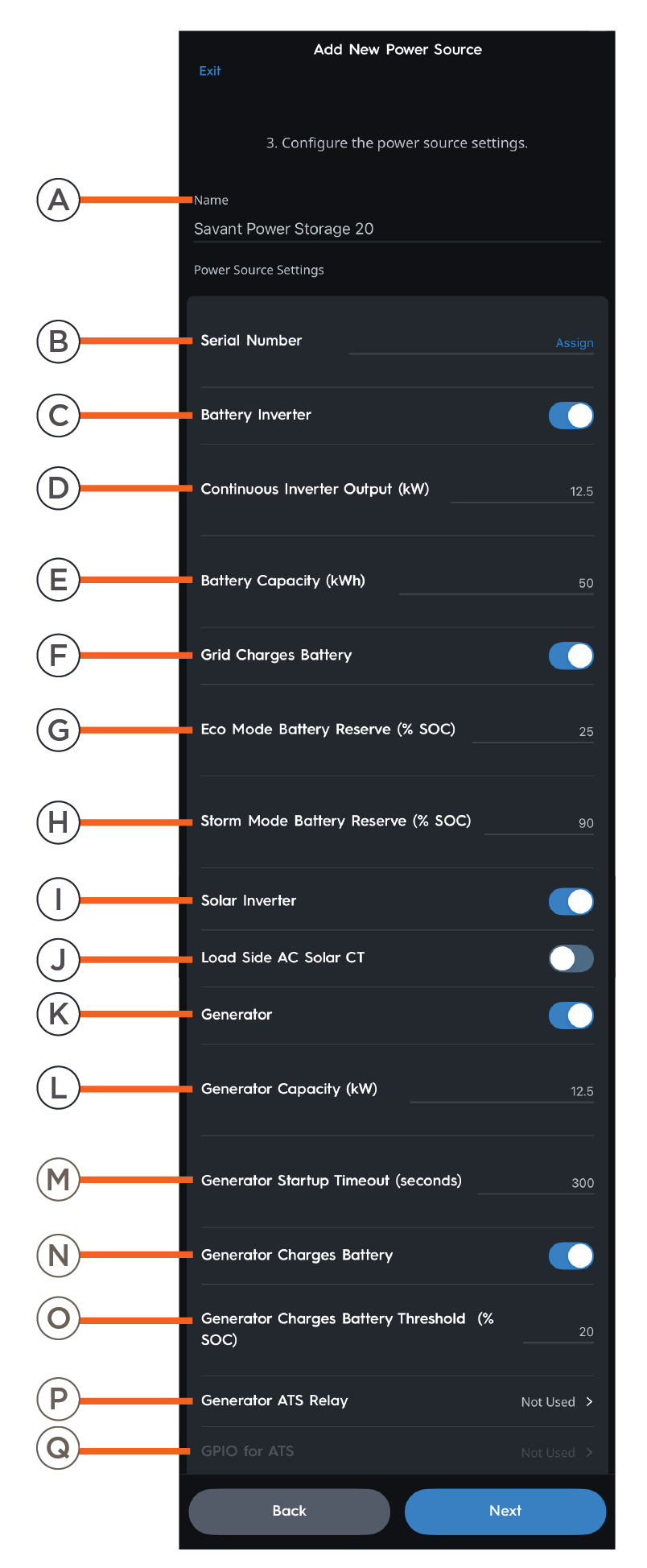 | A | Name | Name of the inverter as it will appear in the Savant Power & Light app. |
| B | Serial Number | Savant Power Storage 20 or 50 serial number. | |
| C | Battery Inverter | Enabled: Battery inverter is available to the Power Source. Disabled: Battery inverter is not available to the Power Source. | |
| D | Continuous Inverter Output (kW) | Rated capacity of the Inverter. | |
| E | Battery Capacity (kWh) | The capacity of the battery in kWh. | |
| F | Grid Charges Battery | Enabled: Grid will charge the installed battery. Disabled: Grid will not charge the installed battery. | |
| G | Eco Mode Battery Reserve (% SOC) | The minimum state of charge the battery will drain to while On Grid. | |
| H | Storm Mode Battery Reserve (% SOC) | The state of charge the battery will charge to while Storm Mode is active. | |
| I | Solar Inverter | Enable to show solar data within the Savant app. Disable if the home does not have solar panels. | |
| J | Load Side AC Solar CT | Enable if a Current Track Module or SEM-2015 is used to measure Solar production. | |
| K | Generator | Enable if a generator is present within the Savant Power System. | |
| L | Generator Capacity (kW) | The capacity of the generator in kW. | |
| M | Generator Startup Timeout (seconds) | The amount of time for the system to detect a generator startup failure. | |
| N | Generator Charges Battery | Enabled: Generator will charge the installed battery. Disabled: Generator will not charge the installed battery. | |
| O | Generator Charges Battery Threshold (% SOC) | Battery State of Charge the Generator will turn on to charge batteries while Off Grid. | |
| P | Generator ATS Relay | Enable to use GPIO for detecting a Generator connected to the Grid Port. | |
| Q | GPIO for ATS | Assign to use GPIO for detecting a Generator Connected to the Grid Port. |
Enphase
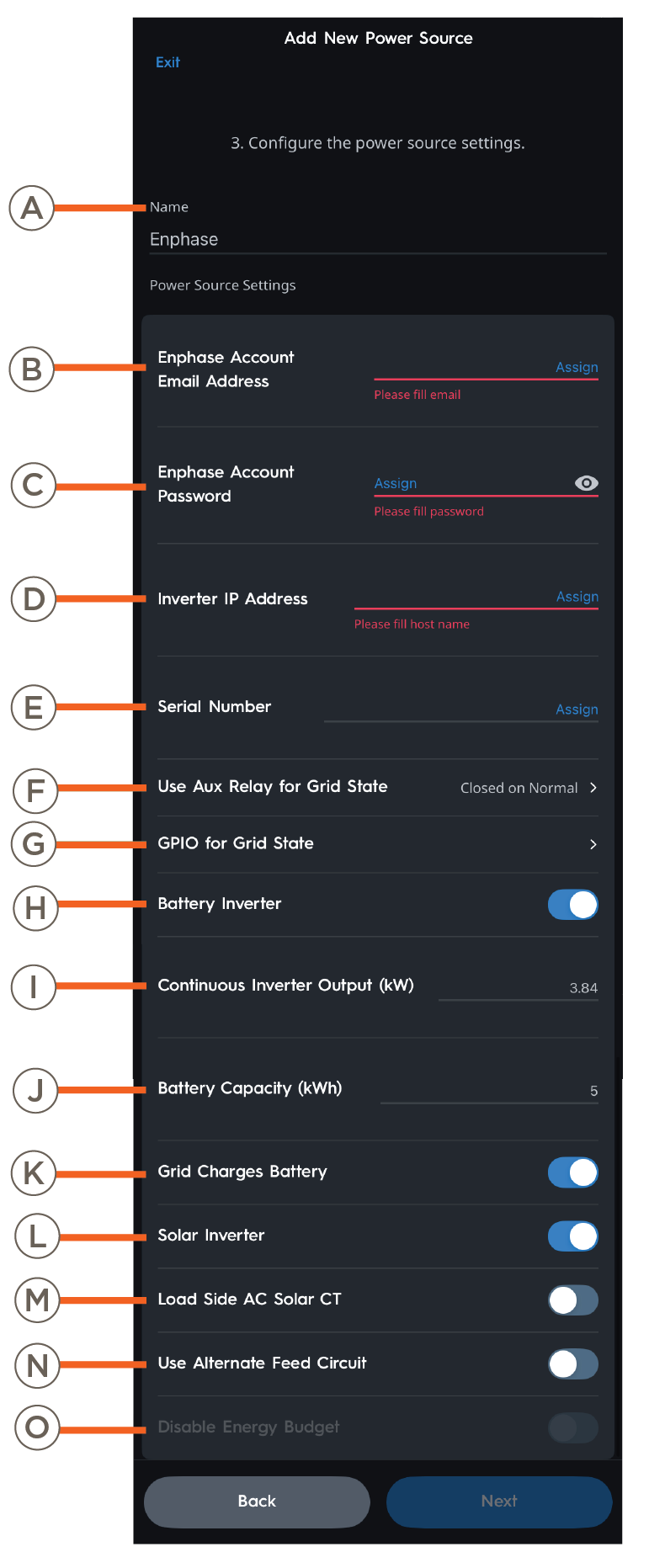 | A | Name | Name of the inverter as it will appear in the Savant Power & Light app. |
| B | Enphase Account Email | Enter the Enphase account email address. | |
| C | Enphase Account Password | Enter the Enphase Account password. | |
| D | Inverter IP Address | IP Address of the Inverter. | |
| E | Serial Number | Enphase serial number. | |
| F | Use Aux Relay for Grid State | Set to "Closed on Normal". This setting is required. | |
| G | GPIO for Grid State | Choose GPIO 1 or 2 input on the Director. | |
| H | Battery Inverter | Whether batteries are present within the Savant Power System. | |
| I | Continuous Inverter Output (kW) | Rated capacity of the Inverter. | |
| J | Battery Capacity | The capacity of the battery in kWh. | |
| K | Grid Charges Battery | Enabled: Grid will charge the installed battery. Disabled: Grid will not charge the installed battery. | |
| L | Solar Inverter | Enable to show solar data within the Savant app. Disable if the home does not have solar panels. | |
| M | Load Side AC Solar CT | Enable if a Current Track Module or SEM-2015 is used to measure Solar production. | |
| N | Use Alternative Feed Circuit | Enable to monitor Feed with a Current Track Module instead of Inverter data. | |
| O | Disable Energy Budget | Enabled: The inverter is capable of powering the entire load of the Home during a power outage. Disabled: The inverter is not able to power the entire load of the Home during a power outage. |
FranklinWH
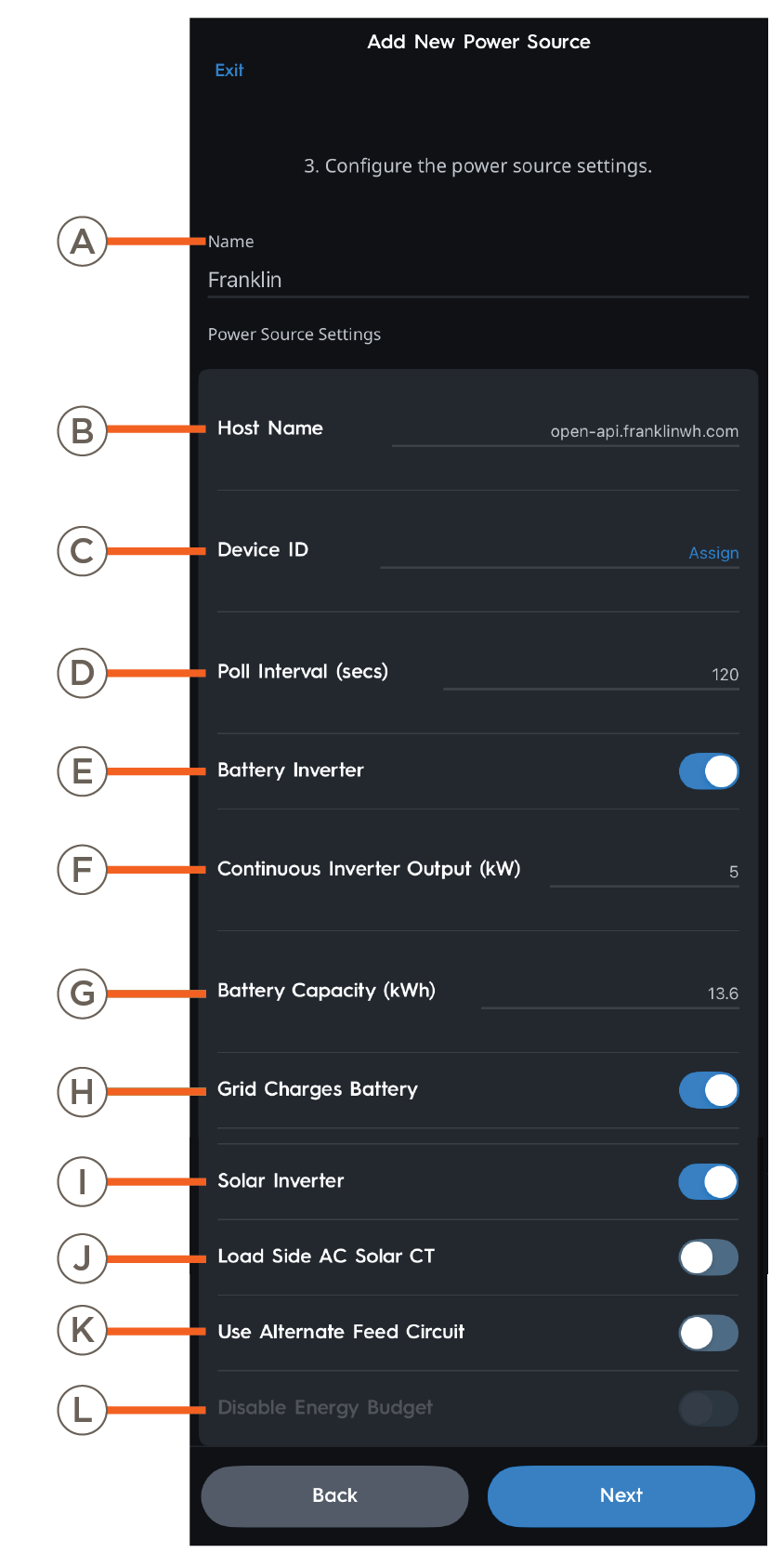 | A | Name | Name of the inverter as it will appear in the Savant Power & Light app. |
| B | Inverter IP Address | IP Address of the Inverter. | |
| C | Device ID | FranklinWH serial number of the "aGate". Visit FranklinWH Documentation or more information. | |
| D | Poll Interval (secs) | The frequency at which inverter status is requested from the Franklin cloud. | |
| E | Battery Inverter | Enabled: Storage or Solar inverter is available to the Power Source. Disabled: Storage or Solar inverter is not available to the Power Source. | |
| F | Continuous Inverter Output (kW) | Rated capacity of the Inverter. | |
| G | Battery Capacity (kWh) | The capacity of the battery in kWh. | |
| H | Grid Charges Battery | Enabled: Grid will charge the installed battery. Disabled: Grid will not charge the installed battery. | |
| I | Solar Inverter | Enable to show solar data within the Savant app. Disable if the home does not have solar panels. | |
| J | Load Side AC Solar CT | Enable if a Current Track Module or SEM-2015 is used to measure Solar production. | |
| K | Use Alternate Feed Circuit | Enable to monitor Feed with a Current Track Module instead of Inverter data. | |
| L | Disable Energy Budget | Enabled: The inverter is capable of powering the entire load of the Home during a power outage. Disabled: The inverter is not able to power the entire load of the Home during a power outage. |
Schneider Electric Insight
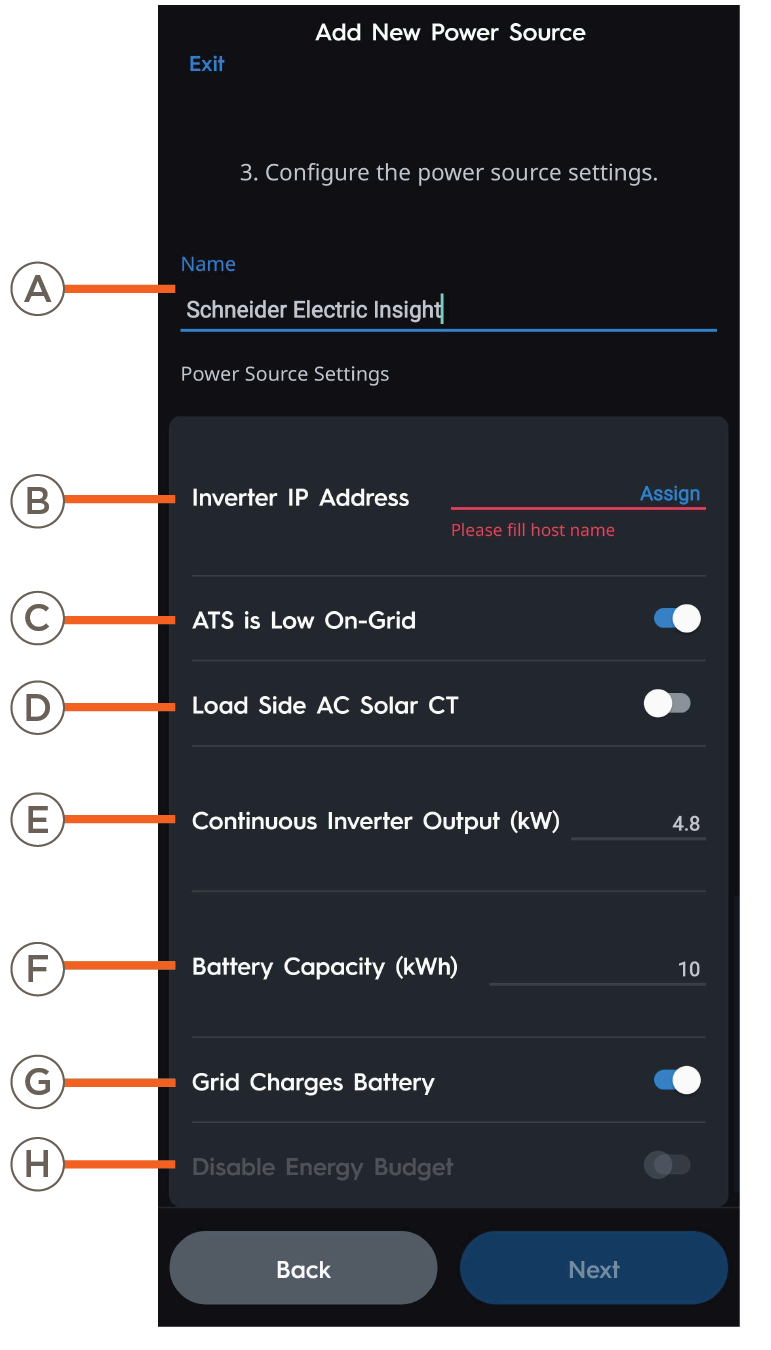 | A | Name | Name of the inverter as it will appear in the Savant Power & Light app. |
| B | Inverter IP Address | IP Address of the Inverter. | |
| C | ATS is Low On-Grid | Enabled: GPIO that monitors Grid State is Normally Closed. Disabled: GPIO that monitors Grid State is Normally Open. | |
| D | Load Side AC Solar CT | Enable if a Current Track Module or SEM-2015 is used to measure Solar production. | |
| E | Continuous Inverter Output (kW) | Rated capacity of the Inverter. | |
| F | Battery Capacity (kWh) | The capacity of the battery in kWh. | |
| G | Grid Charges Battery | Enabled: Grid will charge the installed battery. Disabled: Grid will not charge the installed battery. | |
| H | Disable Energy Budget | Enabled: The inverter is capable of powering the entire load of the Home during a power outage. Disabled: The inverter is not able to power the entire load of the Home during a power outage. |
Simulator Microgrid
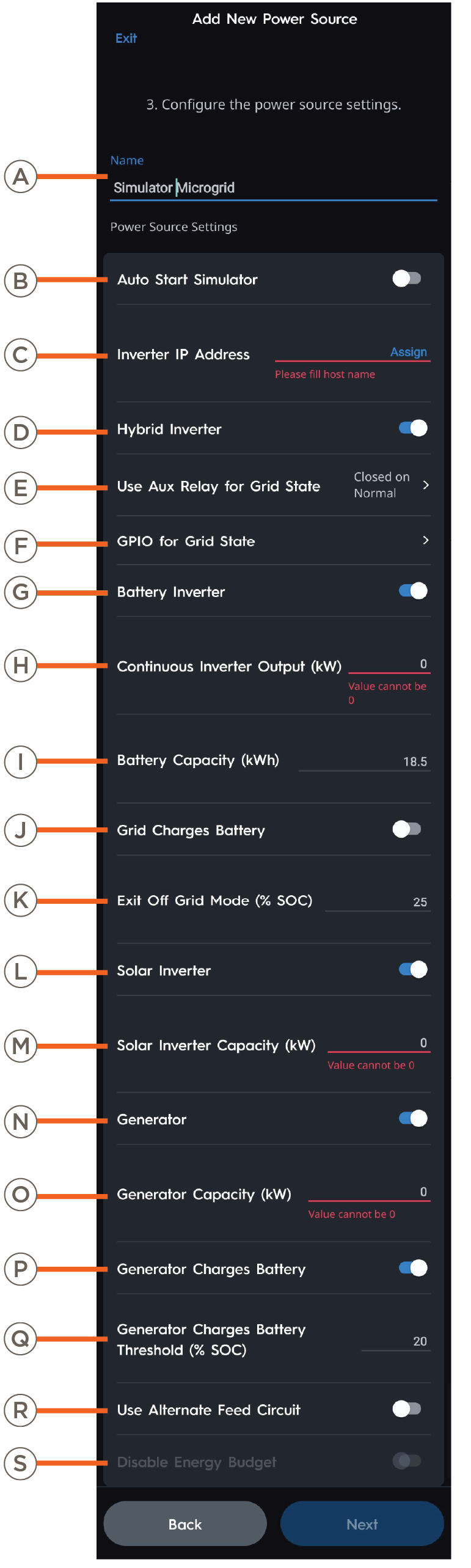 | A | Name | Name of the inverter as it will appear in the Savant Power & Light app. |
| B | Auto Start Simulator | Simulator starts automatically after the host finished boot up. | |
| C | Inverter IP Address | Enter the IP Address of the Host. | |
| D | Hybrid Inverter | Always select enabled. | |
| E | Use Aux Relay for Grid State | Set to "Closed on Normal". This setting is required. | |
| F | GPIO for Grid State | Choose GPIO 1 or 2 input on the Director. | |
| G | Battery Inverter | Enabled: Battery inverter is available to the Power Source. Disabled: Battery inverter is not available to the Power Source. | |
| H | Continuous Inverter Output (kW) | Rated capacity of the Inverter. | |
| I | Battery Capacity (kWh) | The capacity of the battery in kWh. | |
| J | Grid Charges Battery | Enabled: Grid will charge the installed battery. Disabled: Grid will not charge the installed battery. | |
| K | Exit Off Grid Mode (% SOC) | Battery State of Charge the simulator will return to Eco Mode. | |
| L | Solar Inverter | Enable to show solar data within the Savant app. Disable if the home does not have solar panels. | |
| M | Solar Inverter Capacity (kW) | The capacity of the inverter in kW. | |
| N | Generator | Enable if a generator is present within the Savant Power System. | |
| O | Generator Capacity (kW) | The capacity of the generator in kW. | |
| P | Generator Charges Battery | Enabled: Generator will charge the installed battery. Disabled: Generator will not charge the installed battery. | |
| Q | Generator Charges Battery Threshold (% SOC) | Battery State of Charge the Generator will turn on to charge batteries while Off Grid. | |
| R | Use Alternate Feed Circuit | Enable to monitor Feed with a Current Track Module instead of Inverter data. | |
| S | Disable Energy Budget | Enabled: The inverter is capable of powering the entire load of the Home during a power outage. Disabled: The inverter is not able to power the entire load of the Home during a power outage. |
SolarEdge
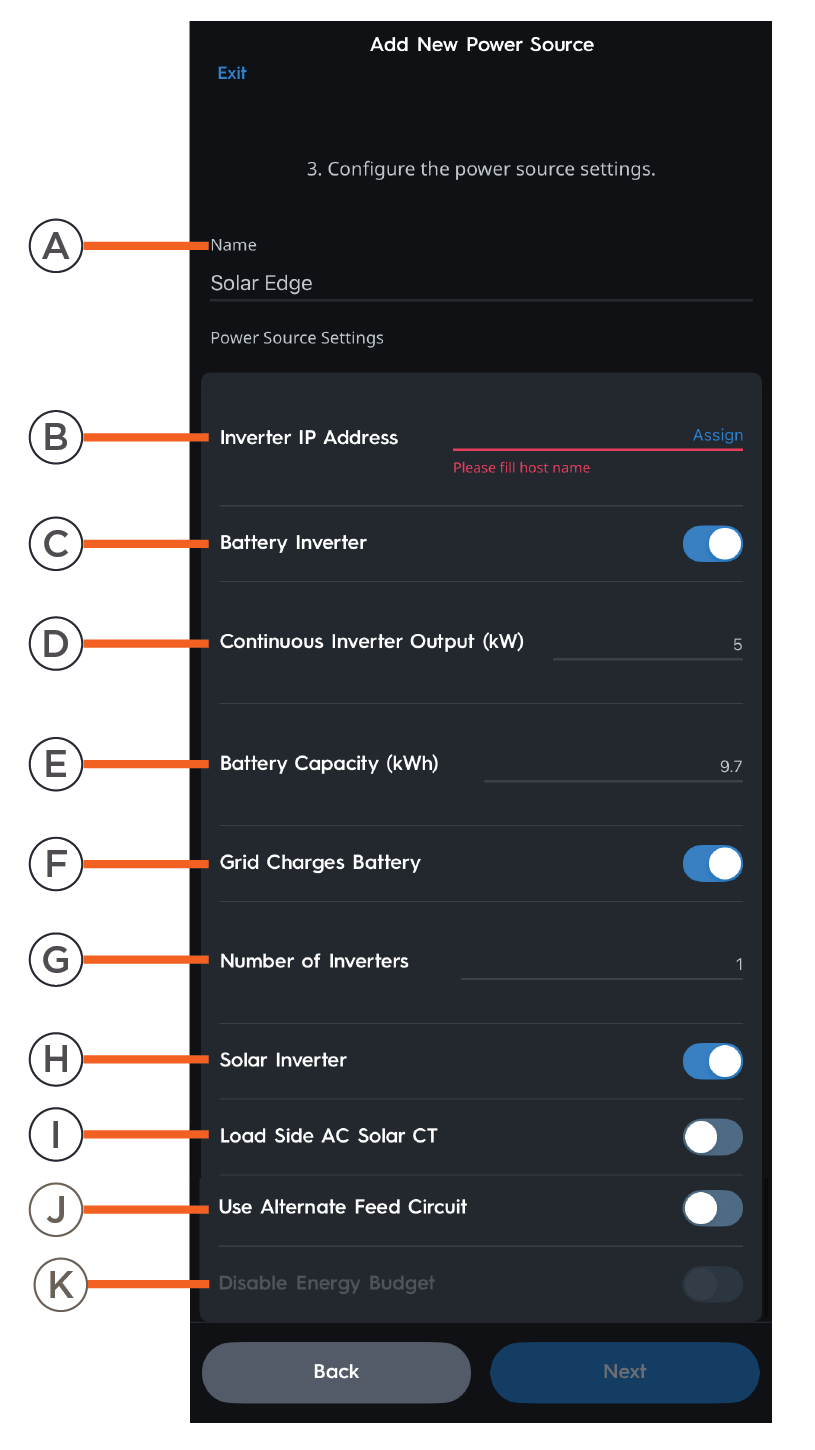 | A | Name | Name of the inverter as it will appear in the Savant Power & Light app. |
| B | Inverter IP Address | IP address of the inverter. | |
| C | Battery Inverter | Enabled: Battery inverter is available to the Power Source. Disabled: Battery inverter is not available to the Power Source. | |
| D | Continuous Inverter Output (kW) | Rated capacity of the inverter. | |
| E | Battery Capacity (kWh) | The capacity of the battery in kWh. | |
| F | Grid Charges Battery | Enabled: Grid will charge the installed battery. Disabled: Grid will not charge the installed battery. | |
| G | Number of Inverters | Quantity of installed inverters. | |
| H | Solar Inverter | Enable to show solar data within the Savant app. Disable if the home does not have solar panels. | |
| I | Load Side AC Solar CT | Enable if a Current Track Module or SEM-2015 is used to measure Solar production. | |
| J | Use Alternative Feed Circuit | Enable to monitor Feed with a Current Track Module instead of Inverter data. | |
| K | Disable Energy Budget | Enabled: The inverter is capable of powering the entire load of the Home during a power outage. Disabled: The inverter is not able to power the entire load of the Home during a power outage. |
Sonnen Inverter
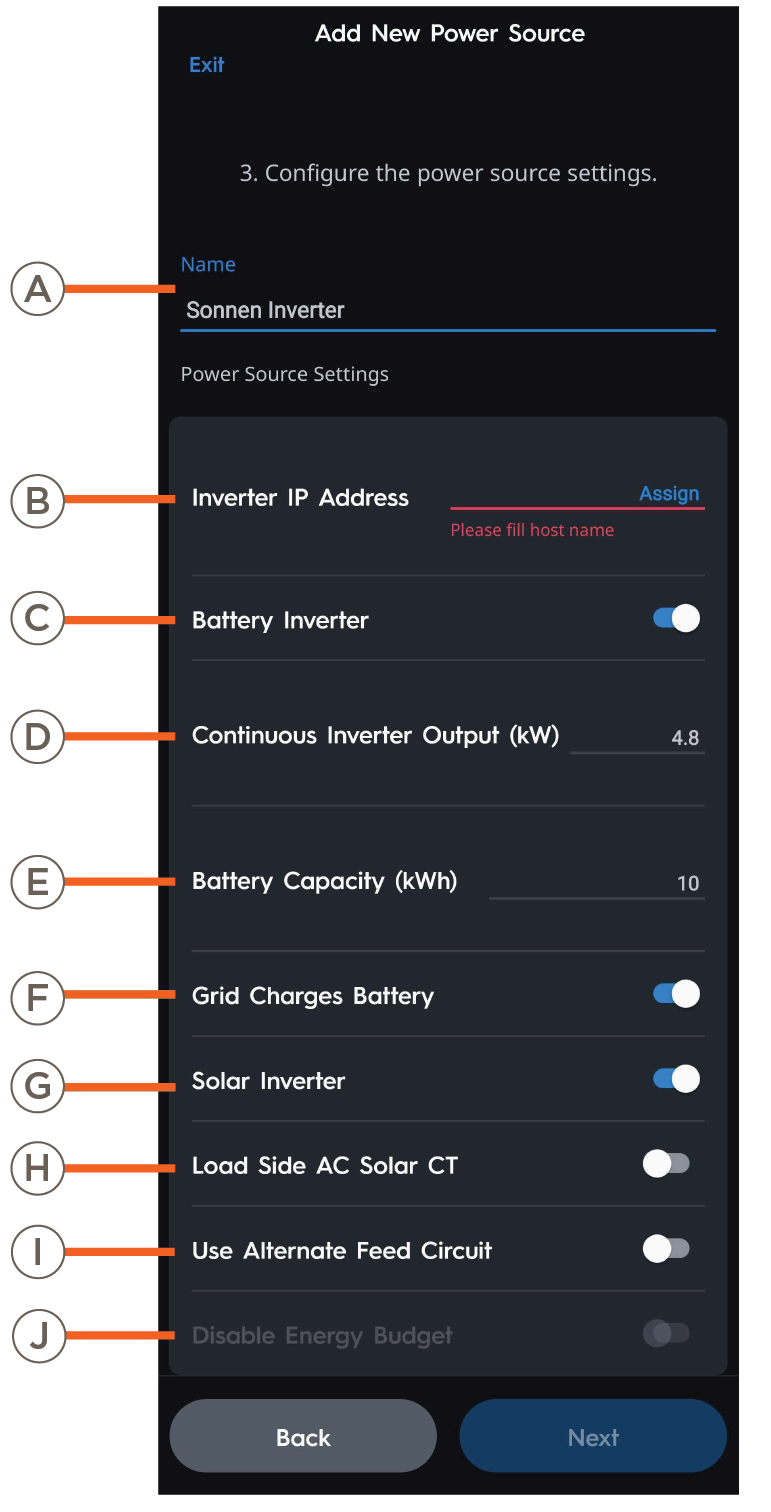 | A | Name | Name of the inverter as it will appear in the Savant Power & Light app. |
| B | Inverter IP Address | IP Address of the Inverter. | |
| C | Battery Inverter | Enabled: Battery inverter is available to the Power Source. Disabled: Battery inverter is not available to the Power Source. | |
| D | Continuous Inverter Output (kW) | Rated capacity of the Inverter. | |
| E | Battery Capacity (kWh) | The capacity of the battery in kWh. | |
| F | Grid Charges Battery | Enabled: Grid will charge the installed battery. Disabled: Grid will not charge the installed battery. | |
| G | Solar Inverter | Enable to show solar data within the Savant app. Disable if the home does not have solar panels. | |
| H | Load Side AC Solar CT | Enable if a Current Track Module or SEM-2015 is used to measure Solar production. | |
| I | Use Alternate Feed Circuit | Enable to monitor Feed with a Current Track Module instead of Inverter data. | |
| J | Disable Energy Budget | Enabled: The inverter is capable of powering the entire load of the Home during a power outage. Disabled: The inverter is not able to power the entire load of the Home during a power outage. |
Tesla Powerwall 2, Tesla Powerwall 3, and Tesla Powerwall+
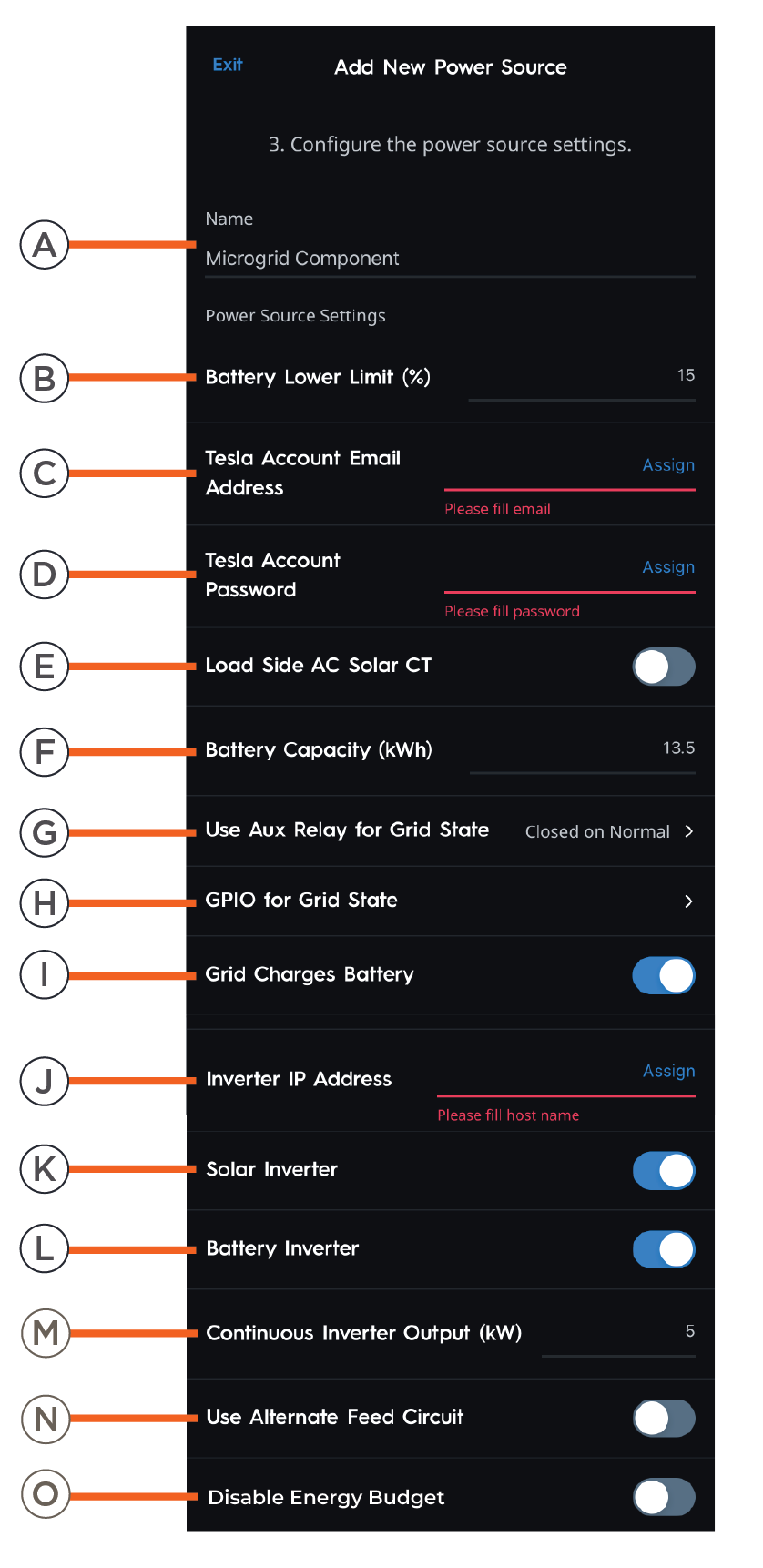 | A | Name | Name of the inverter as it will appear in the Savant Power & Light app. |
| B | Battery Lower Limit | Affects battery scaling of the Savant Power system - should be set to 5% as a default. Example: When set to 5%, the Savant Power System will reflect the battery is at 0% within the Savant Power & Light app at 5%. | |
| C | Tesla Account Email | Enter Tesla Gateway account email here. | |
| D | Tesla Account Password | Enter Tesla Gateway account password here. | |
| E | Load Side AC Solar CT | Enable if a Current Track Module or SEM-2015 is used to measure Solar production. | |
| F | Battery Capacity | The capacity of the battery in kWh. | |
| G | Use Aux Relay for Grid State | If using GPIO to measure Grid State set to "Closed on Normal". Otherwise set to "Not Used". | |
| H | GPIO for Grid State | Choose GPIO 1 or 2 input on the Director. | |
| I | Grid Charges Battery | Enabled: Grid will charge the installed battery. Disabled: Grid will not charge the installed battery. | |
| J | Inverter IP Address | IP Address of the Inverter. | |
| K | Solar Inverter | Enable to show solar data within the Savant app. Disable if the home does not have solar panels. | |
| L | Battery Inverter | Whether batteries are present within the Savant Power System. | |
| M | Continuous Inverter Output (kW) | Rated capacity of the inverter. | |
| N | Use Alternative Feed Circuit | Enable to monitor Feed with a Current Track Module instead of Inverter data. | |
| O | Disable Energy Budget | Enabled: The inverter is capable of powering the entire load of the Home during a power outage. Disabled: The inverter is not able to power the entire load of the Home during a power outage. |
IMPORTANT! The Tesla Account must be the Customer Account used to log into the Telsa Gateway. This account can sometimes differ from the credentials used to log into the Telsa App. Follow the Tesla Documentation to log into the Gateway as a customer account to verify the credentials are correct.
Sol-Ark 12K and Sol-Ark 15K
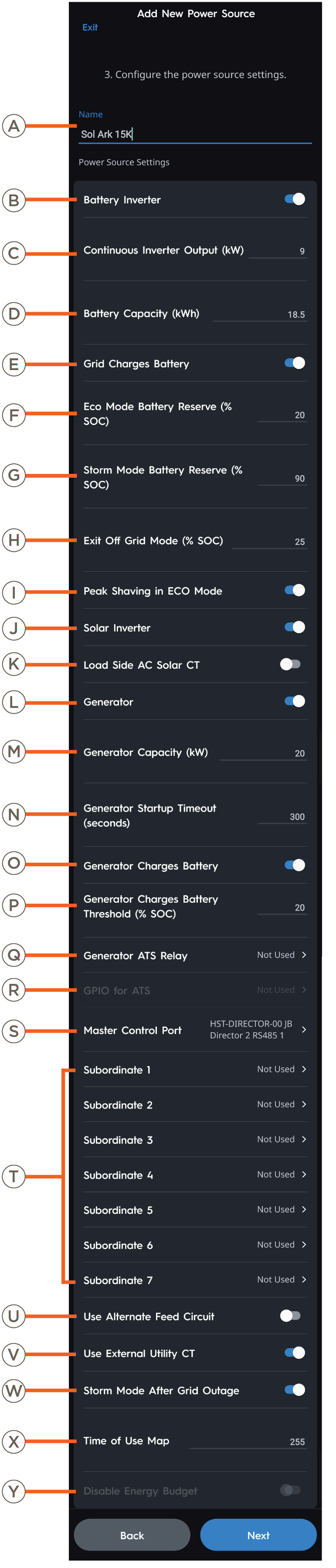 | A | Name | Name of the inverter as it will appear in the Savant Power & Light app. |
| B | Battery Inverter | Enabled: Battery inverter is available to the Power Source. Disabled: Battery inverter is not available to the Power Source. | |
| C | Continuous Inverter Output (kW) | Rated capacity of the inverter. | |
| D | Battery Capacity (kWh) | The capacity of the battery in kWh. | |
| E | Grid Charges Battery | Enabled: Grid will charge the installed battery. Disabled: Grid will not charge the installed battery. | |
| F | Eco Mode Battery Reserve (% SOC) | The minimum State of Charge the battery will drain to while On Grid. | |
| G | Storm Mode Battery Reserve (% SOC) | The State of Charge the battery will charge to while Storm Mode is active. | |
| H | Exit Off Grid Mode (% SOC) | Battery State of Charge the simulator will return to Eco Mode. | |
| I | Peak Shaving in ECO Mode | Peak shaving can be enabled in ECO mode. Peak Shaving is Limiting the maximum amount of power the home will pull from the grid.
| |
| J | Solar Inverter | Enable to show solar data within the Savant app. Disable if the home does not have solar panels. | |
| K | Load Side AC Solar CT | Enable if a Current Track Module or SEM-2015 is used to measure Solar production. | |
| L | Generator | Enable if a generator is present within the Savant Power System. | |
| M | Generator Capacity (kW) | The capacity of the generator in kW. | |
| N | Generator Startup Timeout (seconds) | The amount of time for the system to detect a generator startup failure. | |
| O | Generator Charges Battery | Enabled: Generator will charge the installed battery. Disabled: Generator will not charge the installed battery. | |
| P | Generator Charges Battery Threshold (% SOC) | Battery State of Charge the Generator will turn on to charge batteries while Off Grid. | |
| Q | Generator ATS Relay | Enable to use GPIO for detecting a Generator connected to the Grid Port. | |
| R | GPIO for ATS | Assign to use GPIO for detecting a Generator Connected to the Grid Port. | |
| S | Master Control Port | RS485 Port connected to the leader inverter. | |
| T | Subordinate 1-7 | RS485 port connected to follow inverters. | |
| U | Use Alternate Feed Circuit | Enable to monitor Feed with a Current Track Module instead of Inverter data. | |
| V | Use External Utility CT | Monitor Feed with Current Track Module instead of Inverter data. | |
| W | Storm Mode After Grid Outage | Enable to set the inverter to Storm Mode when returning from a Grid Down event. | |
| X | Time of Use Map | A bit map for enabling the Time of Use (TOU) settings. Different bits refer to different days of the week:
| |
| Y | Disable Energy Budget | Enabled: The inverter is capable of powering the entire load of the Home during a power outage. Disabled: The inverter is not able to power the entire load of the Home during a power outage. |