Savant Power System - Panel Limit Feature
| Document Date: | April 2026 |
| Document Supports: | Savant Power Storage App v3.0.6 PS20 Firmware v1.5.3 PS50 Firmware v1.5.3 |
Overview
The Panel Limit feature allows customers to use the Power Storage system for rate arbitrage, taking advantage of the full 12.5KW inverter capability without the need for a costly panel replacement.
Normally, to comply with NEC 705 and other building codes, output must be permanently limited to avoid exceeding the panel rating or a higher capacity panel must be installed. Enabling the Panel Limit feature monitors the grid input and the output from the Power Storage system to ensure that the combined amperage never exceeds 80% of the upstream panel’s rated capacity. The Savant Power Storage system can be used as the sole additional power source for the panel, or used with existing AC coupled solar for additional cost savings, allowing for greater install flexibility.
NOTE: Connecting a single power storage 20 or 50 to a home for rate arbitrage will allow Panel Limit Feature but does not provide off grid backup. Simplicity of install is a benefit of this method.
System Design
In Savant Power Storage systems using Panel Limit Mode, the inverter prevents overloading the busbar by measuring and summing the current flow at the power meter location (1) and inverter grid port (2) as shown in the diagram below:
- A power meter measuring current upstream of the panelboard bus at its grid input / main panel breaker location. This example requires a AGF-AE-D-200.
- The Power Storage inverter, which is connected from its grid port to the upstream 240V/120V panelboard via a 2P/70A overcurrent protection device.
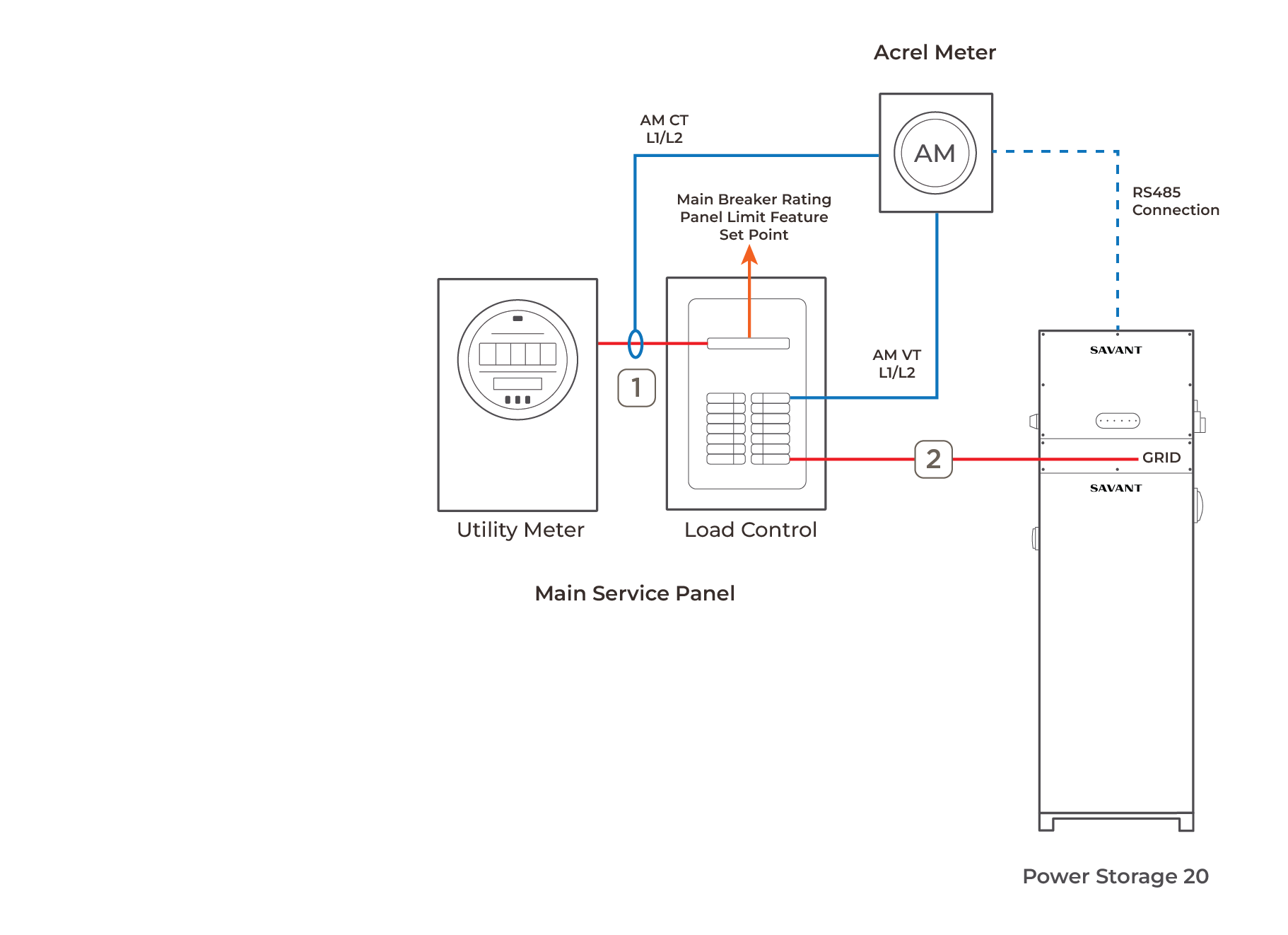
Panel Limit Behavior
The CTs monitor the behavior of the Savant System at their respective locations and report the information back to the Savant System. When the system detects one of the following behaviors, it will act accordingly:
- If the sum of the current measured at the power meter and inverter grid port is greater than or equal to 80% of the panelboard's main overcurrent protection device (the Panel Limit Setpoint), the inverter will go into Standby Mode.
 IMPORTANT!: The Panel Limit Set Point must only be configured by a licensed electrician in the Savant Power Storage (SPS) app.
 - If the inverter is discharging and the sum of the current measured at the power meter and the inverter grid port meets or exceeds the Panel Limit Setpoint, the inverter will go into Standby Mode and cease discharging. The inverter resumes operation when the total current on the bus is below 75% of the panel OCPD rating for 5 minutes.
- If the inverter is charging and the current measured at the power meter meets or exceeds the Panel Limit Setpoint, the inverter will go into Standby Mode and cease charging. The inverter will resume operation when the total current on the bus is below 75% of the panel OCPD rating minus the BMS-allowed charge rating for 5 minutes.
NOTE: Typical BMS-allowed charge rating for PS20 is 6.25kW and for PS50 12.5kW. - If the the inverter loses communication with the upstream power meter, the inverter will enter Standby Mode and cease charging or discharging as a fail-safe. An alarm condition is displayed in the SPS app. Operation will not resume until the inverter reestablishes communication with the power meter.
- No loads in the upstream panel are be backed up in grid outage situations.
Requirements
IMPORTANT NOTE!: The Panel Limit Feature is only supported for systems that meet the following conditions:
System Requirements
- Maximum panel size no greater than 200A.
- Only a single inverter is supported. Multiple or parallel configurations are NOT supported.
- An Acrel Meter connected to the inverter. Current Tracker Modules are NOT supported.
Solar / PV Considerations
The Panel Limit feature is compatible with multiple installation types, including AC coupled and DC coupled solar, with the following considerations:
DC Solar
- DC coupled solar must be connected to the Savant Inverter MPPTs battery operation mode
- The Storage System Battery Operation Mode must be set to Meter Zero or Excess Solar to grid. In Meter Zero Mode, DC coupled solar will not be exported to the grid.
AC Solar
- AC coupled solar, Savant recommends connecting to the upstream panel.
- AC coupled solar must be connected to the main electrical panel and will not be controlled by the savant system.
- If AC Coupled solar power is input to the system, a CTM with CTs must be installed to measure solar production. Otherwise Grid, and Consumption values will be inaccurate.
Additional Installation Considerations
- For installations with a meter load center combo - additional work may be required to achieve monitoring of the grid input / main breaker.
- No loads may be connected to the Savant inverter.
- If the upstream panel is a Main Lug Only (MLO) constructed panelboard, the nearest upstream breaker rating is used for this Panel Limit Feature.
- All other generation sources in the upstream panel shall comply with NEC 705.12. The Savant Power Storage System cannot control other loads or generation sources.
- The Savant app is not required for Panel Limit Feature but there is no user interface without it. If a user interface is desired you must install a director or host and configured following normal Savant Power Storage Deployment
Third Party Testing & National Electric Code Compliance
- A Power Control System (PCS) is defined as a system which electronically limits or controls the steady state AC or DC currents to a programmable limit or level.
- The Savant Power Storage 20 (PS20) and Savant Power Storage 50 (PS50) have been tested and certified under the UL 1741 PCS standard.
- The PS20 and PS50 can operate as a PCS to control the import and export of power at its grid terminal.
- All overcurrent protection devices located within the upstream panelboard shall still be sized accordingly to protect all wiring and equipment fed by that panel regardless of the addition of a supplemental load side source connection.
- The PCS shall be programmed such that the system does not exceed the limitations of the overcurrent devices in the panelboard and connected circuit.
- The PCS shall be coordinated with the limits defined by NEC 210.20, 705.12, or NFPA 70 2020 edition section 705.13.
Savant Power Storage Specifications and Features
For specifications and features on Savant Power Storage Systems and Inverter see the Savant Power Storage 20 Specification Sheet or Savant Power Storage 50 Specification Sheet.
Panel Limit Mode Configuration using Savant Power Storage (SPS) App
This section details the process of configuring the Panel Limit Feature on a Savant Power Inverter. For more detailed information on specific screens and fields, see the Savant Panel Limit Feature section in the Savant Power Storage App Setup Guide.
- Place the system in Meter Zero Mode. From the Home screen, navigate to Settings in the top right corner and select Battery Operation > Meter Zero. This enables the Inverter to backfeed power to the grid port.
- Set the Backup Reserve SOC to 17% and Low Battery Alarm SOC to 10%. Setting the Backup SOC to 17% will allow for maximum battery utilization.
- Configure the Time of Use Based rate plan. This allows the user to select when the battery power will be prioritized to cover loads in the house. Typically, a utility will publish a chart detailing electricity rate pricing - showing when electricity rates are highest. These high rate periods are often refered to as On-Peak. The SPS app has many prebuilt On-Peak rate plans. For example, if electricity is most expensive between 2PM and 7PM, select the “Everyday Peak2P-7P”.
 HELPFUL!: Savant support can help create more complex rate plans if required.
- Systems with No DC Solar must configure the time and charge rate for the battery. In the Schedules menu, select add a Timer. Savant recommends a charge rate of 3500W for 6 hours with start and stop times during periods when electricity is the least expensive.
Note: If this period of time coincides with other high-load periods (EV Charging overnight, for example), the battery may not fully charge. If the charge rate and duration is less than the capacity of the battery, the system may not fully charge each night.
- Navigate from the Home screen to Interconnection Settings > Power Control System, (PCS) Settings > Panel Limit Mode.
- Toggle Panel Limit Mode ON.
- Set the Panel Amperage Rating to the grid input/ main breaker over current protection device. If the panel is main lug only, use rating of the closest upstream over current protection device (OCPD) feeding the panel.
Example: A 100A Main Breaker Panel has a 100A Panel Amperage Rating and the app should be configured for 100A. The software automatically calculates the 80% set point below this rating. The Panel Limit Set Point is automatically calculated to be 80% of the feeder OCPD rating and cannot be modified.DANGER: Entering an amperage rating higher than the panel's overcurrent device or busbar rating may result in panel failure. Contact support with any questions before proceeding. Only a licensed electrician may enable and configure this mode.