Savant Power Storage System - No Solar/Rack Backup Solution Guide
| Document Date: | January 2025 |
Overview
This guide describes installation and app configuration steps for a single, non-parallel, PS20/PS50 unit (one (1) inverter, one (1) battery) as a backup power solution without AC solar, DC solar or a backup generator. This solution only supports split-phase (120/240V). Three-phase or single 120V-only configurations are not supported.
Connections are made from the inverter’s GRID terminal to the utility grid input, and the LOAD terminal to the sub-panel intended for backup. Loads should not exceed 52A. (12.5kW) Note that there is no Flexible Load Management (FLM) downstream. Ensure only essential loads are connected.
The system is configured using Savant Power Storage app setting backup reserve and charging schedule.
IMPORTANT! For installations with highly sensitive equipment (i.e, networking equipment), it is recommended to install a small uninterruptible power supply (UPS) downstream of the inverter to minimize potential disruption during transfer events. The Power Storage system's transfer time is less than 70 ms; however, depending on the sensitivity of the connected devices, brief interruptions may still occur. It is advisable to test connected loads during commissioning. If disruptions or reboots persist, supplementing with a UPS is strongly encouraged.
Below is an overview of a No Solar/Rack Backup Solution.
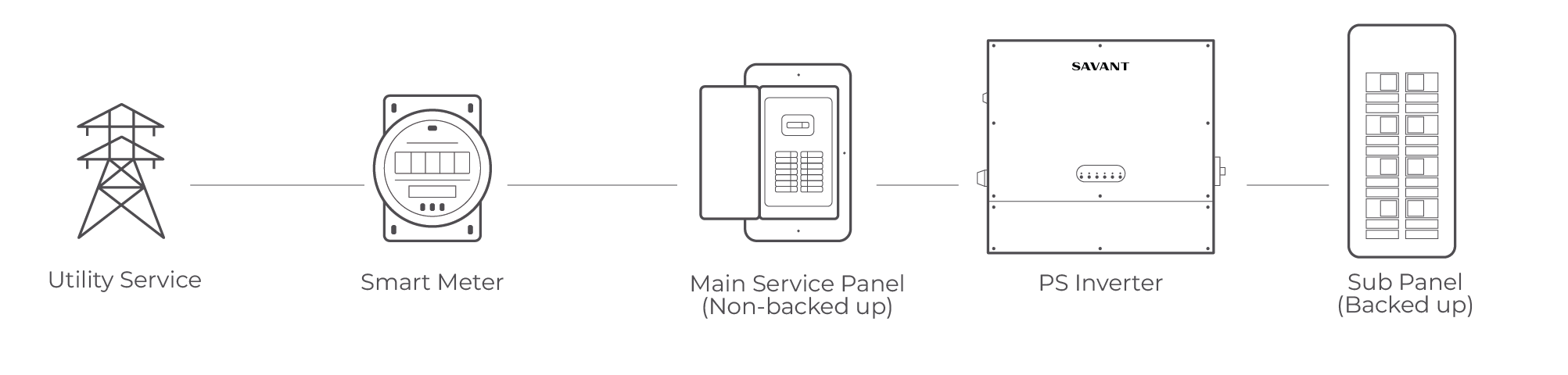
System Hardware Configuration
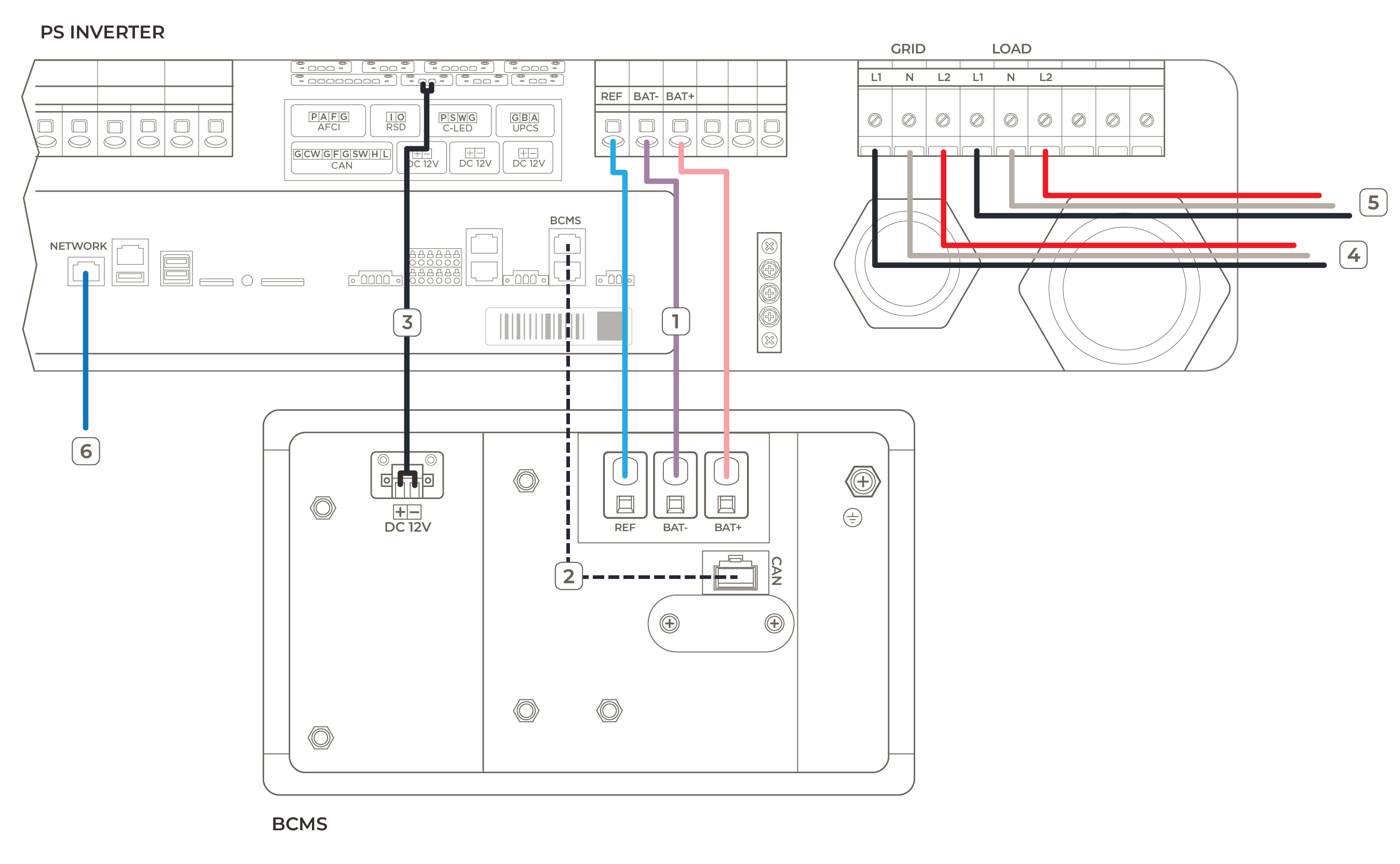
- Connect the BCMS Output ports to the inverter battery terminals.
- Connect the BCMS CAN Port to the Inverter BCMS Port using a CAT5 or higher rated cable.
- Connect the 12V DC port of the Inverter to the DC 12V Input port of the BCMS.
- Connect inverter GRID port to the grid.
- Connect inverter LOAD port to load(s).
- Connect inverter to the same local network as the Savant host or Director using a CAT5 or higher Ethernet cable.
NOTE: Use waterproof port where required.
Expected Behavior
- The Power Storage system will maintain the configured Backup Reserve SoC while on grid. Upon loss of grid power, the battery will supply power to the load until either the battery reaches its minimum allowable SoC or grid power is restored.
- Once grid power is restored the battery will automatically recharge to the configured Backup Reserve SoC.
- A weekly recharge of the battery to 100% is required to maintain proper calibration.
- Once the battery charge is complete, it will immediately provide power to the load until it returns to the Backup Reserve SoC.
System Software Configuration
- Follow steps in the Savant Power Storage App Setup Guide to set up and configure single inverter.
- In the Savant Power Storage app, navigate to Battery Operation > Mode and set to Self Sufficiency.
- Set Backup Reserved SoC value. This is a user-configured minimum state of charge (SoC) in which the battery will maintain to provide backup power.
NOTE: It is recommended to be set to 90% to ensure maximum battery availability for backup. - Set SoC Recalibration Charging Schedule. When the battery backup reserve is set to the maximum backup capacity, the battery needs to be charged once per week to 100% to recalibrate the SoC agorithm. This can be done at any time and we recommend doing during off peak hours.
Maximum Capacity Backup Charging Schedule Backup Reserve SoC Approximate Capacity to Charge to 100% Recommended Weekly Charge Rate Recommended Weekly Duration PS20 90% 2 kWh 2 kW 1 hour PS50 90% 5 kWh 2 kW 2.5 hours NOTE: The battery will automatically stop charging at 100%